


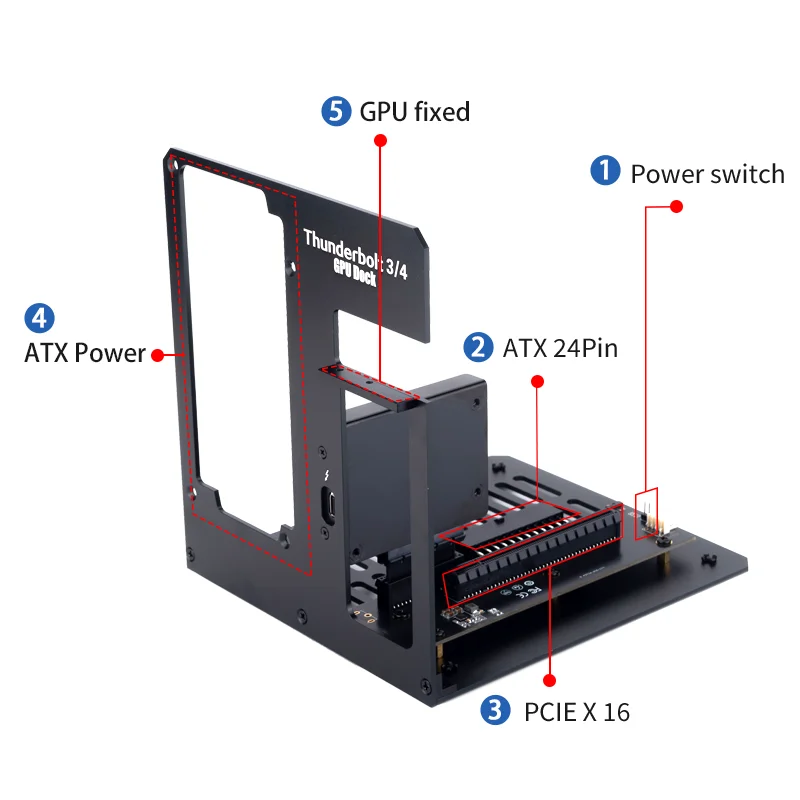


You’ve got a high-end desktop GPU sitting around because you switched to a laptop, or maybe you just want to plug a powerhouse graphics card into a Thunderbolt-equipped machine without building a whole new desktop. That’s exactly the kind of problem this external bracket stand is trying to solve.
What This Bracket Actually Lets You Do
Here’s the thing — most external GPU enclosures are expensive, bulky, and come with their own built-in power supply. This approach takes a different route. It’s a bare-bones stand that holds your graphics card vertically, provides the Thunderbolt 3 or 4 connection to your computer, and lets you install any standard ATX power supply you already own or pick up separately. That’s a solid money-saver if you’ve got a spare PSU lying around. The compatibility list includes the RTX 4090 and RX 7900 XT, which are currently two of the most powerful consumer GPUs. So the bracket isn’t limiting you to older or weaker cards — it’s ready for the big stuff.
Thunderbolt 3/4 and the Specs That Matter
The interface is Thunderbolt 3 or 4, meaning you get up to 40Gbps bandwidth. That’s crucial for driving an external GPU, and honestly, it’s the only realistic way to connect an eGPU to a modern laptop. According to the product specs, the supported GPU list is exactly RTX 4090 and RX 7900 XT, and it requires an ATX power supply. Everything else — like the material of the bracket itself, the exact dimensions, or the length of the included cable (if any) — isn’t detailed in the listing. But here’s a quick rundown of what is confirmed:
- Interface: Thunderbolt 3/4
- Supported GPU: RTX 4090 / RX 7900 XT
- Power Supply: ATX (not included)
- Form Factor: External bracket stand
Fair warning: you’ll need to supply your own GPU, your own ATX power supply, and your own Thunderbolt cable. The bracket itself is just the frame and likely the PCIe riser cable that connects the card to the Thunderbolt controller.
A Couple of Honest Gaps to Know About
Because the listing doesn’t spell out the exact build quality or the thickness of the metal, you’re trusting that the bracket is sturdy enough to hold a heavy card like an RTX 4090. Those cards are massive and heavy. Also, there’s no mention of whether the bracket includes any active cooling for the GPU or the Thunderbolt controller — you’ll be relying on the card’s own fans. That’s usually fine, but in an open stand, airflow is better than in a closed enclosure. But one missing detail: the dimensions of the bracket itself aren’t given, so you’ll want to measure your desk space before ordering. If this is an imported item, shipping times could also be longer than expected.
Who Might Actually Want This Setup?
If you already own a high-end GPU and a spare ATX power supply, this bracket could be the most affordable way to turn that hardware into an external solution for a Thunderbolt laptop. It also makes sense if you want to keep your desktop GPU accessible for quick swaps or testing. And for people who dislike the noise and heat of a fully enclosed eGPU box, an open stand lets everything breathe better. What if you don’t have a spare PSU? Well, you’ll need to buy one, but ATX power supplies are relatively cheap compared to the premium that eGPU enclosures charge.
Real talk: this isn’t a plug-and-play solution for everyone. You need to be comfortable mounting a GPU and connecting power cables. But if you’ve built a PC before, you’ll manage just fine.
So, if the idea of an open, customizable eGPU rig sounds right for your workflow or gaming setup, this bracket is worth a closer look. Just double‑check with the seller about the exact dimensions and included components before you click buy.




Reviews
There are no reviews yet.